Guides2 min read
How to Play the MicroBrick Daily Challenge: One Board a Day, One Attempt
The MicroBrick daily challenge lives on the Compete tab: one new board a day, one attempt that counts, and it's free to play. Open it, play it, and your time is the result.
Open the game, find today's board first
You open MicroBrick looking for something fresh. The 240 hand-made levels in the worlds will wait — you can retry those as many times as you like. The daily challenge won't: one new board a day, one attempt, and then it's gone until tomorrow. The question is how to play the MicroBrick daily challenge — and the answer starts with where it is and what the rules are.
The daily challenge is on the Compete tab at the bottom of the screen. Open it and you'll see the Daily Board section, dated today. One new board every day, and only one attempt counts — the run you finish is the run that stands, so there's no grinding it for a better time. The Daily Board is part of the free game, no Premium needed.
Where to find the daily challenge
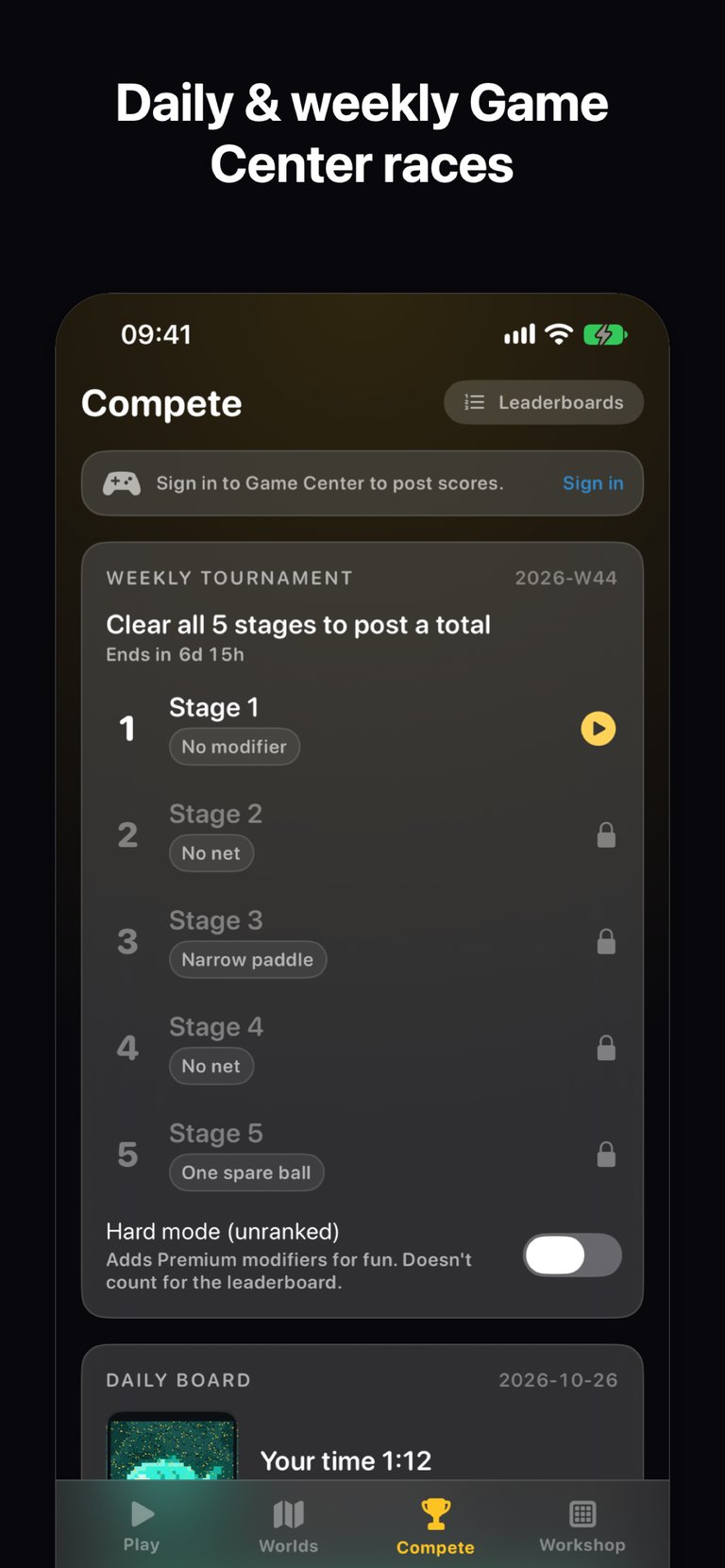
Open MicroBrick and tap Compete at the bottom. The top half of the page is the Weekly Tournament; below it sits the Daily Board, with today's date next to it. Tap in and you play the board like any other level: move the paddle, clear the bricks, reveal the pixel-art picture underneath. The screenshot shows a finished run with a time of 1:12 — that time is your result for the day.
One attempt — how should you play it?
One attempt means exactly that: the run you finish is the run that counts. There's no replaying it for a better time, so don't treat it like a world level you can grind.
Nothing fancy changes in how you play. Balls split with no cap, so a flood can build fast once you hit split bricks and power-ups; when the screen fills up, keep the paddle steady before chasing anything. If the pressure gets to you, the game has an auto paddle assist. And your hands get their practice elsewhere — the world levels and Endless Flood are there every day, while the daily board is the one run where the practice shows.

What to look at when you're done
Your time. The finished run in the screenshot took 1:12. While you're on the Compete tab, look up: the Weekly Tournament runs five fixed-seed stages, each with a modifier — no net, a narrow paddle, a single spare ball — and clearing all five submits a total score to the weekly leaderboard. The daily board and the tournament live on the same page, so one visit covers both.
If today's run went well and you want to send it to a friend, read how MicroBrick 2.1 turns a cleared level into a shareable result card — that post covers the card with stars, peak ball count and time.
One thing to try tonight
Tonight, do one thing: open MicroBrick, tap Compete, and play today's Daily Board. Check your time when you're done — tomorrow brings a new board.

MicroBrick
One ball becomes millions. Clear pixel-art pictures made of up to 50,000 tiny bricks.

 Scan with your iPhone